New: Resume Check Catches Layout Issues in Your Resume on Every Build
A single word on the last line, an overlong bullet, an extra period, inconsistent dates. Small details are easy to miss but shape first impressions. GitResume now checks for them on every build, and AI agents can read the results and fix them for you.

I’ve tried plenty of free and paid resume review services over the years, and I noticed that resumes are full of simple details that people often overlook. These are often exactly what shapes a hiring manager’s first impression. When I spot them myself, my thought is that the candidate wasn’t careful enough.
Take a look at the resume below. Can you spot what’s wrong?
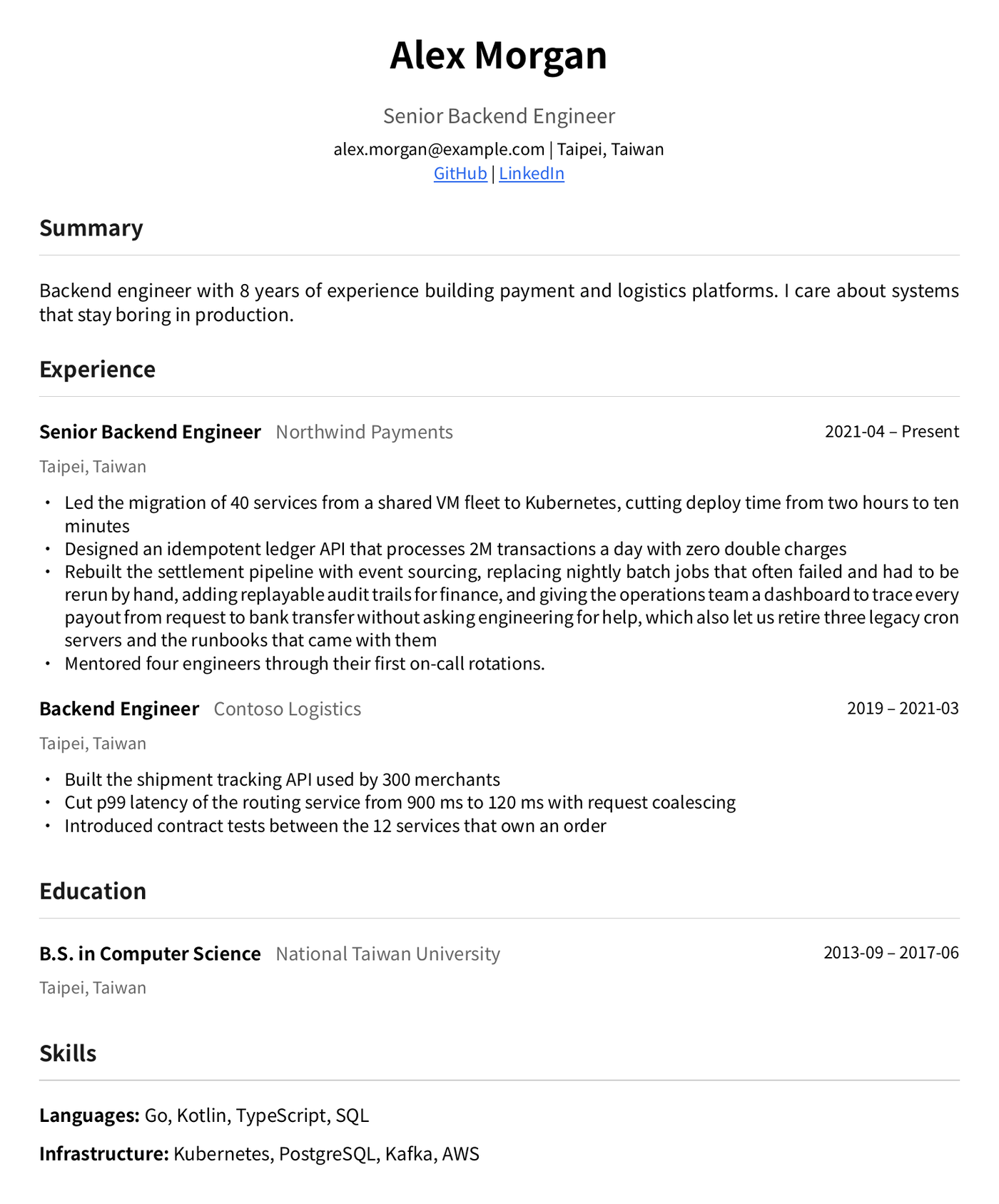
Let me point them out one by one:
- A single word on the last line: in the first Northwind bullet, the second line is just “minutes”.
- An extra period: the last Northwind bullet ends with a period, while none of the others do.
- A bullet that runs long: the third Northwind bullet wraps to 4 lines, and recruiters mostly just skim.
- Inconsistent date formats: Contoso’s start date is “2019” while its end date is “2021-03”.
I don’t think everyone would catch these. In my experience, even now that most people use AI to review their resumes, not every AI agent flags problems this small. Saying they decide whether you get an interview might be a stretch, but first impressions are built from details like these. If you can avoid them, why not?
GitResume has been live for half a year now, and I kept wondering how to help users avoid these problems entirely.
Today I can say this is one of the features I’m most excited about since launch, because these problems can now be prevented completely. The idea came from how I write code: there are so many lint tools that catch code smells, so why not resumes? GitResume was built as a Resume as Code platform from day one, so this is a perfect match. Here it is:
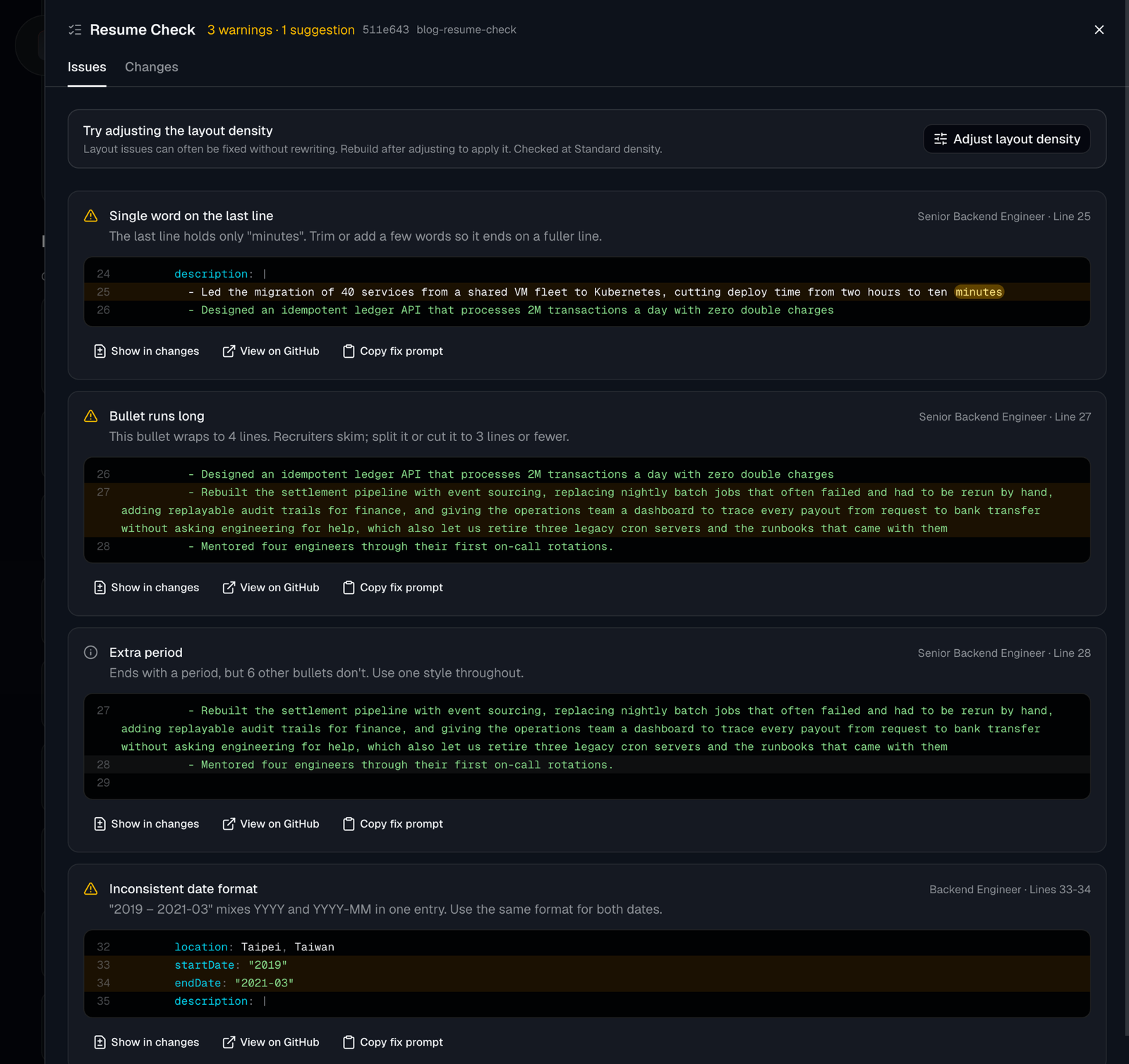
Starting now, GitResume checks your resume on every build, catches issues like these automatically, and points to the exact YAML lines to change. See? It’s no different from writing code.
In an earlier post I argued that your time should go into the content. Layout and details like these, you can leave entirely to GitResume.
Let your AI agent handle it
We’ve also extended the MCP server with two new capabilities:
- Reading Resume Check results: your AI agent gets the line numbers and explanation for each issue, and can edit your YAML directly.
- Adjusting layout density: layout issues don’t always need a content change. For example, when the last page has only a few lines, your AI agent can tighten the margins a little without touching the font size, then rebuild and check again.
That way, layout and lint issues can be left entirely to AI, and you can focus on the content.
Start using it
Resume Check works on every plan with no setup. Your next push, or clicking “Build Now” on the project page, shows the results. For projects not connected to GitHub, clicking “Build” on the edit page does the same.
New to GitResume? Sign in at gitresume.co with GitHub or Google, hand your existing PDF resume to an AI, and it moves over in minutes.