How to Use Career-Ops with GitResume: Tailored Resumes, Checked Before You Send
A step-by-step guide to using Career-Ops with GitResume: Career-Ops tailors your resume to each job, and GitResume checks the layout details and gives each version its own URL and PDF. No Git needed, your AI agent uploads it directly.
 Hao @ GitResume Updated October 13, 2026
 You used AI to tailor a resume for a job, and the content is spot on.
But the last line of the PDF holds a single word. One bullet wraps to 4 lines. Within the same job entry, one date says “2019” and the other says “2021-03”.
Small details like these are easy to miss, yet they shape first impressions. In my experience, even now that most people use AI to write their resumes, not every AI agent flags problems this small.
That is what Career-Ops and GitResume solve together.
What is Career-Ops
Career-Ops is an open-source AI job search system that runs on AI agents such as Claude Code. Paste a job link and it scores the fit, analyzes ATS keywords, and produces a tailored resume.
Its author, Santiago, used it to evaluate 740 listings, applied to 68, and got 12 interviews and 1 offer.
What it produces is a set of PDFs on your machine. The content is in the AI’s hands, but nobody is looking at the small layout and formatting problems.
The two things GitResume adds
Resume Check. Every build checks for layout and formatting issues that are easy to miss, such as a single word on the last line, a bullet that runs long, or mixed date formats within one entry. Each reminder points to the exact lines in your resume, and your AI agent can read them and fix them for you. It works on every plan. The full story is in this post.
One project per job. Each tailored version is its own project, with its own URL, web page, and PDF, so you can send a link or attach the file. Your main resume stays untouched. The free plan includes 10 projects.
Here is how the two fit together:
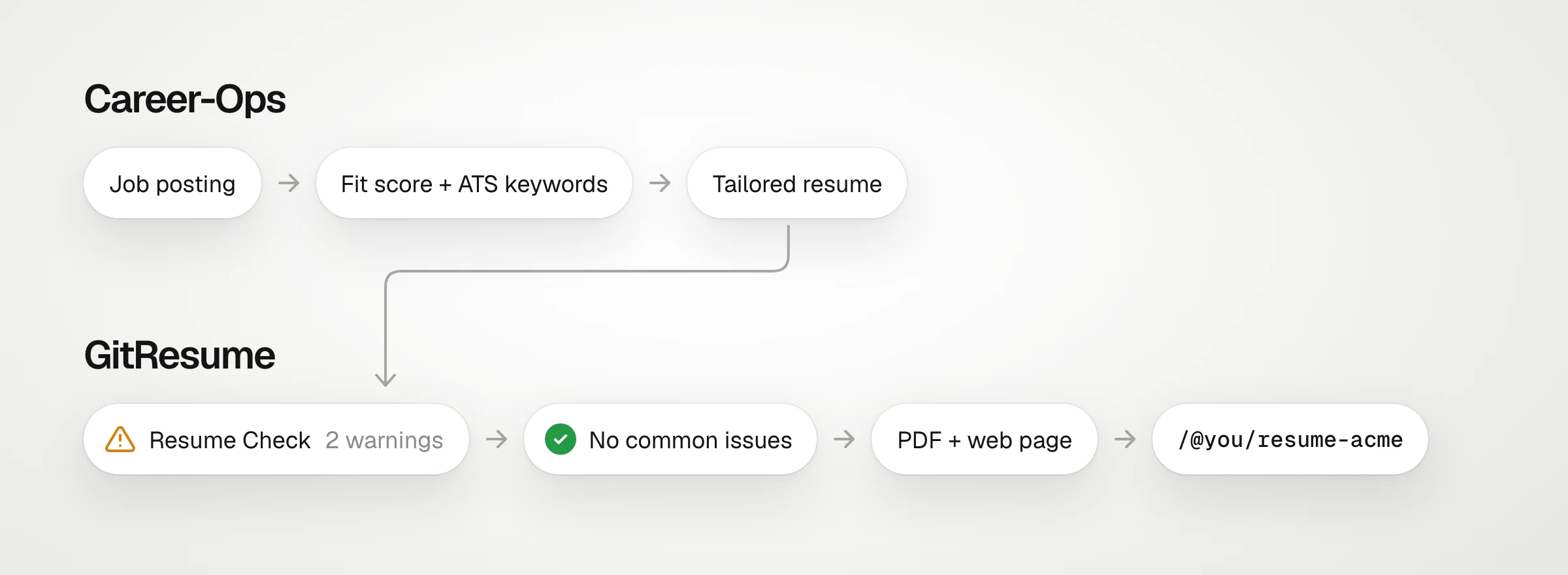
None of this needs Git or a GitHub account. Your AI agent uploads the resume to GitResume directly.
Quick Start
1. Install Career-Ops
Follow the official repo. The official version is all you need, with no separate integration build:
npx @santifer/career-ops initWhen it finishes, you will see this output (from v1.36.0):
✓ career-ops is ready in ./career-ops

Next steps:
  1. cd career-ops
  2. Open your workspace with any of:  claude, gemini, codex, copilot

Optional (for PDF generation):
  npx playwright install chromium
You can skip that last optional step. It is for rendering PDFs on your machine, and with GitResume in place, GitResume builds the PDF.
Career-Ops is not tied to one AI tool. Claude Code, Codex, Copilot, and others all work. The steps below use Claude Code.
2. Connect GitResume
Sign up at gitresume.co. The quickest option right now is Claude: click “Connect to Claude” in Claude’s connector directory and approve. If you’ve already connected, skip this step.
Connect to Claudeclaude.ai/directory/gitresume
Once connected, go into the career-ops directory and start Claude Code. It picks up the connector automatically:
cd career-ops
claude
If you’d rather not go through claude.ai, you can add it by hand in the career-ops directory, then authorize with /mcp once inside:
claude mcp add --transport http gitresume https://gitresume.co/mcpUsing another AI tool? See how to set it up.
It is fine if your main resume is already connected to GitHub. Your AI agent never writes to your GitHub repository. Tailored versions are created as separate projects that are not connected to GitHub, so they don’t affect your main resume.
3. First launch: your resume, your profile, and one rule
Tell your AI agent “Set me up.” It checks the current setup, then asks for your resume and a few details such as target roles, location, and salary target. You can paste the resume as text, give it a file, or give it your LinkedIn URL. If your GitResume account already has a resume, tell it to use that one and you don’t have to provide it again.
At the end of the same message, add this rule:
One house rule to save in modes/_custom.md: I use GitResume, and its connector
is connected. When a tailored CV is ready, do not render a local PDF. Instead,
convert the same content to GitResume YAML, validate it, and create a separate
GitResume project for that job, with search engine indexing turned off.
GitResume builds the PDF and the web page. Show me the Resume Check findings,
and never publish unless I ask.
It will first ask whether to save the rule, because the rule changes where your resume data is sent from now on. Choose “Yes, save it”.
The rule is stored in modes/_custom.md. That is the file Career-Ops reserves for your own rules: it is read on every run and system updates never overwrite it, so the rule still applies when you start a new conversation.
4. Paste a job
Paste the job’s URL or its text. Career-Ops evaluates the job and writes its report as usual. It still checks on your machine that the tailored content doesn’t go beyond your original resume, it just doesn’t turn it into a PDF at the end. Then your AI agent will:
- Convert the same content to GitResume’s format and validate it
- Create a project for this job, for example
resume-acme, with search engine indexing turned off - Show you the Resume Check findings and ask whether to fix them
When you want to send the link, ask your AI agent to publish the project.
I ran it myself
I ran the whole flow with my own resume and a real job posting for a Backend Software Engineer. I used Career-Ops v1.36.0, and my GitResume account started out empty.
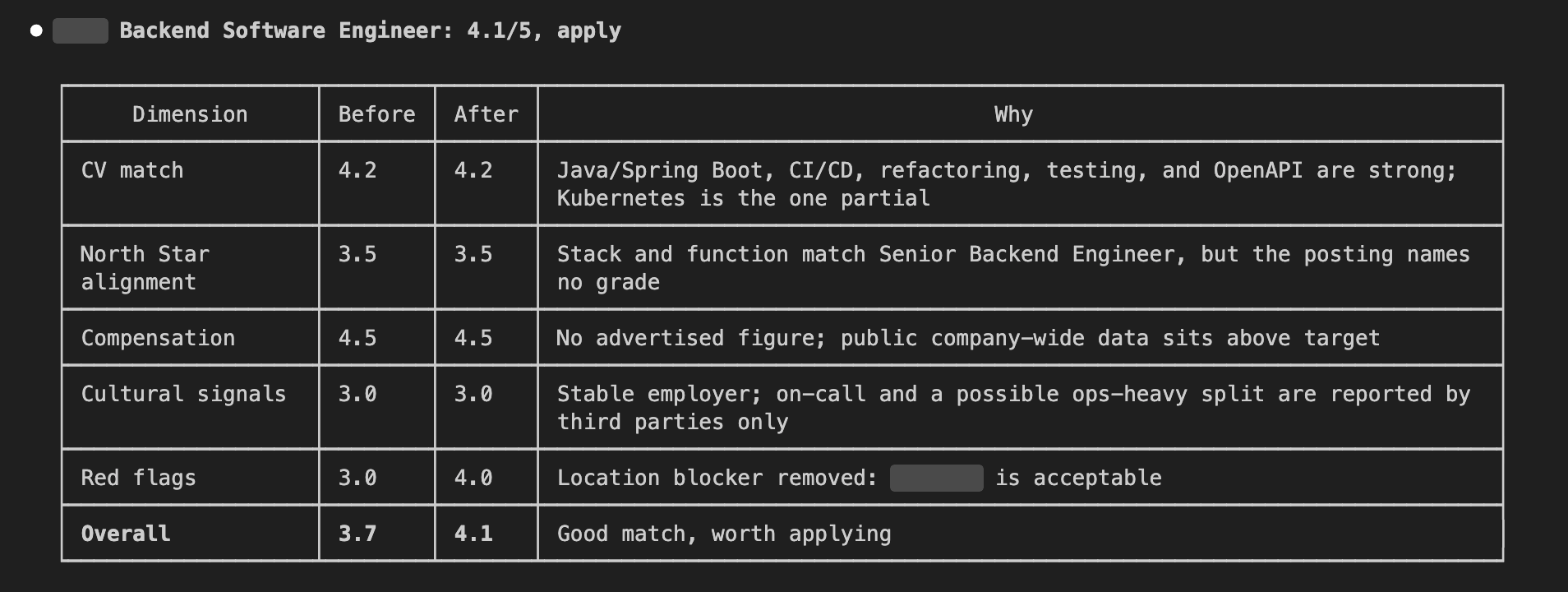
I copied the job text from LinkedIn. Career-Ops first verified it online, found the same role on the company’s own careers site, confirmed it was still open, and then compared it against my resume line by line. The first result was 3.7 out of 5. The posting only said “Taiwan” without naming a city. Career-Ops didn’t guess. It asked me to confirm the location before applying. After I told it where the role is based and that the location works for me, it rescored the job at 4.1 and its recommendation changed from “research first” to “apply”.
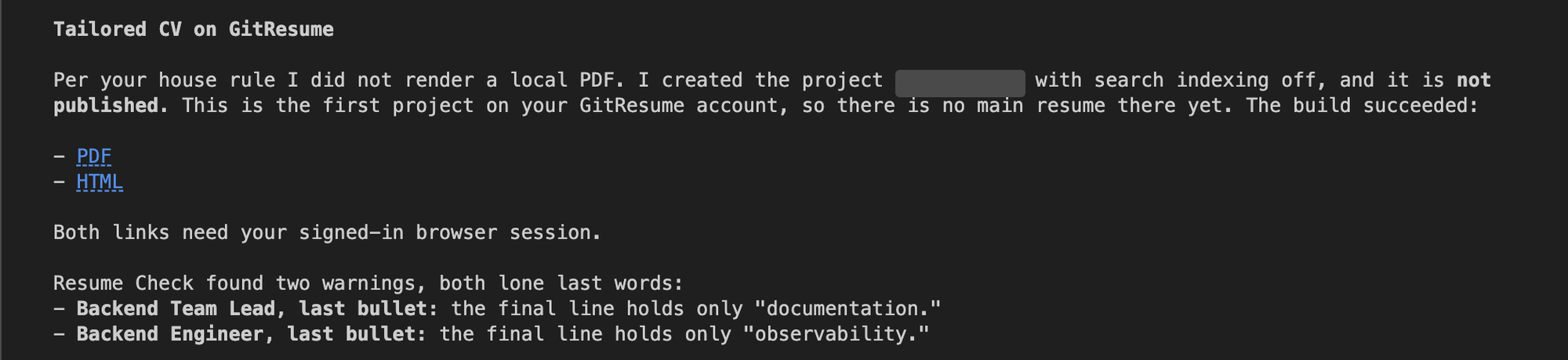
Next came the tailored resume. Following the rule, it didn’t render a PDF on my machine. It created a resume-<company> project for this job on GitResume with search engine indexing turned off, and left it unpublished. Resume Check immediately found two issues, both a single word on the last line.
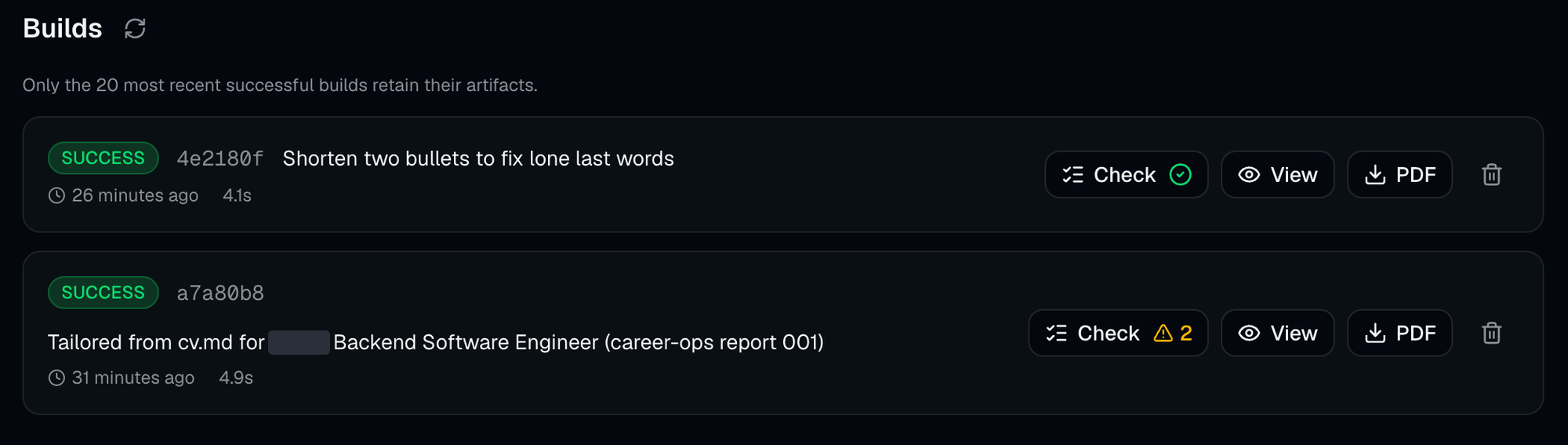
It asked whether to fix them, and I said yes. It shortened those two bullets, uploaded again, and the next check came back clean. I never touched YAML or opened Git.
This is the PDF I ended up with:
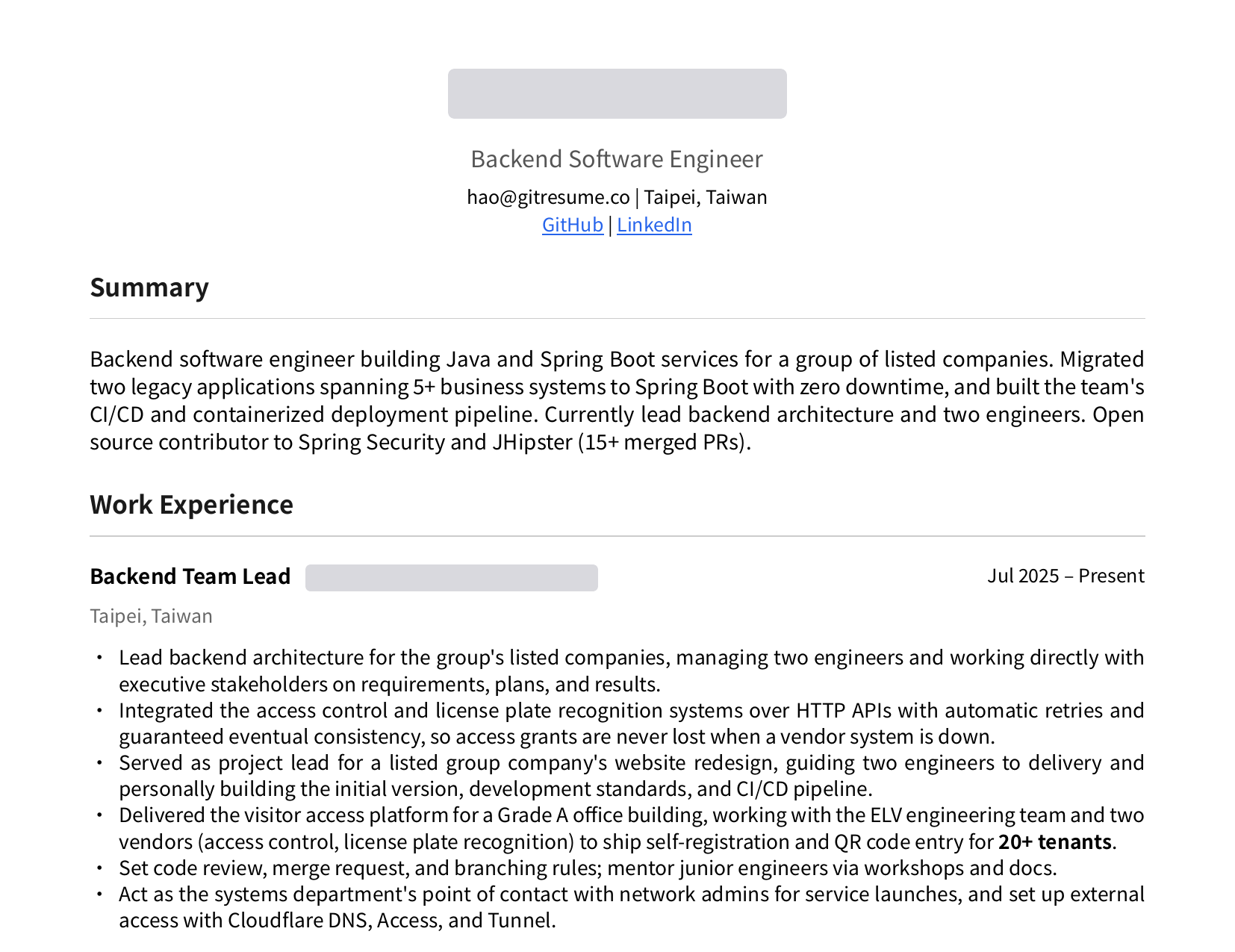
A few things I only learned by running it:
- It is conservative. The posting asks for Kubernetes and OpenAPI, which my resume didn’t mention. It didn’t add them. It asked whether I had actually used them. I said yes to OpenAPI, and only then did it add it to my skills. I said no to Kubernetes, and it left it out entirely. The tailoring was mostly a new summary and moving the bullets that matter for this job to the top. The facts stayed the same.
- It tells you what it changed. It changed my headline from Backend Team Lead to Backend Software Engineer, because this is an individual contributor role, and said it would revert it if I disagreed.
- Time. From pasting the job to seeing the Resume Check results, the AI agent ran for about 6 minutes, most of it spent on Career-Ops’ own evaluation.
Why use both
| Career-Ops only | GitResume only | Both | |
|---|---|---|---|
| AI job analysis | ✓ | ✗ | ✓ |
| ATS keyword optimization | ✓ | ✗ | ✓ |
| Layout and formatting check before you send | ✗ | ✓ | ✓ |
| PDF and web page | PDF only | ✓ | ✓ |
| PDF without installing Chromium locally | ✗ | ✓ | ✓ |
| A URL for each job | ✗ | ✓ | ✓ |
Career-Ops gets the content right. GitResume checks it before you send it.
Wrapping up
When this post first came out in April, my approach was to fork Career-Ops into a version that integrated GitResume directly. Honestly, maintaining that fork was a headache, because upstream moves so fast.
The good news is that in October GitResume redesigned its whole onboarding flow, so creating a resume no longer requires connecting GitHub, and it is now listed in Claude’s connector directory. Connect your AI agent to GitResume’s MCP server and it can create projects and upload resumes for you, so the fork is no longer needed: the official Career-Ops plus one rule is enough. Compared with the April version, the two now work together far more smoothly.
For me, the real value of Career-Ops is filtering. Right now my Grok Bot collects job postings for me on a schedule every day, but all it can do is report a list. There is no score and no consistent standard, so I can’t tell at a glance which ones are worth applying to. Next, I will hand that list to Career-Ops to score each job, and only for those above 4 have GitResume produce a resume for me. I haven’t tried that part yet, but I believe it will save me a lot of time. When I get the chance, I’ll share how it works out.
Further Reading
- Resume Check: what it checks for
- Turn Your Existing Resume into Resume as Code with an AI Agent: start here if you don’t have a GitResume resume yet
- What is Resume as Code?: start here if you want to manage your resume with Git
- AI integration docs: how to connect each AI tool
- Career-Ops: the official GitHub repo