AI 求職組合技 — Career-Ops 客製化 × GitResume 版本控制
結合 Career-Ops 的 AI 履歷客製化與 GitResume 的版本控制與自動建置,打造一套可追蹤、可複盤的 AI 求職 workflow。

你用 AI 產了 20 份客製化履歷。
三週後,你可能已經不知道:
- 哪一份投給哪家公司
- 哪次改了哪些關鍵字
- 哪個版本拿到面試
這就是 Career-Ops × GitResume 組合技開始發揮的地方。
Career-Ops 是什麼
Career-Ops 是一套基於 Claude Code 的開源 AI 求職系統。貼上職缺連結,AI 幫你評估媒合度、分析 ATS 關鍵字、產出客製化履歷,全部在終端機完成。最近在開發者社群蠻紅的。
Career-Ops 的作者 Santiago 用它評估了 740+ 個職缺、產出 100+ 份客製化履歷,最後拿到 Head of Applied AI 的 offer。
但實際操作幾次後就會發現一個硬傷:每份履歷都是孤立的本地檔案。
結果就是:
- 沒有版本歷史,改了什麼、為什麼改,沒有紀錄
- 無法比較優化效果,不知道哪版的關鍵字策略更好
- 無法累積求職策略,每次投遞都是從零開始
AI 產出很強,但管理很痛苦
- Career-Ops 負責「撰寫與優化」:分析 JD、優化關鍵字、客製化內容。
- GitResume 負責「版本管理與建置」:版本控制、自動建置、託管。
一個是 AI pipeline,另一個就是 version control system。如果你還不熟悉 Resume as Code 的概念,可以先看看這篇介紹。
兩者搭起來:
Career-Ops: 分析 JD → 優化關鍵字 → 客製化履歷內容
                          ↓
GitResume:  版本控制 → 自動建置 PDF → 下載或部署到 gitresume.co
GitResume Edition
我們 fork 了 Career-Ops,讓它原生整合 GitResume。
GitHub:gitresume-co/career-ops
- 原版:分析 JD → 產出 HTML → Playwright 轉 PDF → 存在本地
- GitResume Edition:分析 JD → 產出
resume.yaml→ push 到 branch → GitResume 自動建置 PDF
關鍵不是格式,而是讓每次求職變成一次可追蹤的 commit。
快速開始
1. Clone 並開啟
git clone https://github.com/gitresume-co/career-ops.git
cd career-ops
npm install
claude
Claude Code 會自動進入 onboarding,引導你設定 CV 和 Profile。
2. 設定 GitResume
Onboarding 時或隨時執行 /career-ops gitresume。
已有 GitResume repo? 告訴 AI 你的 repo 名稱,完成。
還沒有? AI 會引導你:
- 從 resume-template 建立 repo
- AI 自動把你的
resume.yamlpush 上去 - 去 gitresume.co/start 登入並連結 repo
整個過程大概不到一分鐘。
3. 貼職缺,跑 pipeline
直接貼一個職缺 URL。Career-Ops 會:
- 評估職缺 - 10 個維度加權,A-F 等級
- 產出報告 - 媒合度分析、薪資研究、面試準備
- 產出客製化 resume.yaml - 針對 JD 優化關鍵字、調整經歷順序
- Push 到你的 GitResume repo - 建立
apply/company-namebranch - GitResume 自動建置 - 幾秒內就有 PDF 可以下載
每次投遞都是一個 branch。你的公開履歷(main branch)完全不受影響。
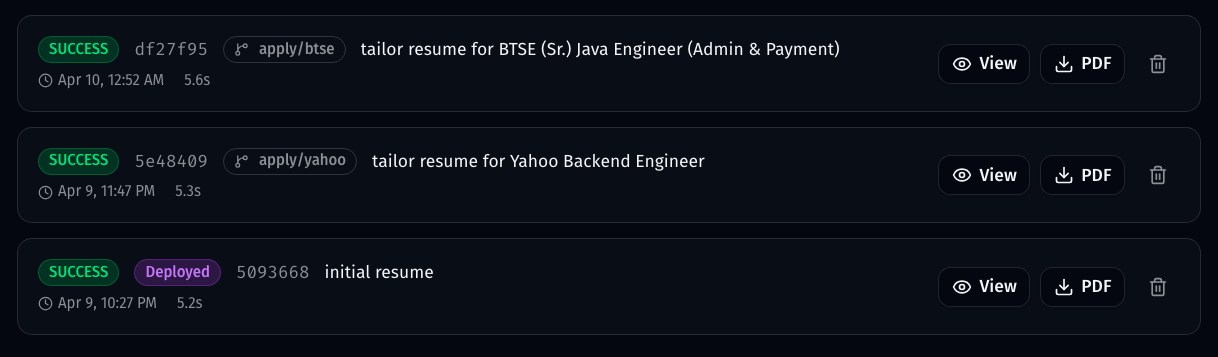 GitResume Dashboard 實際畫面:每個 branch 各自建置,
main 標記為 Deployed
用 git diff 累積求職策略
git diff main..apply/acme-corp -- resume.yaml這其實不只是 diff 檔案,你會開始看出:
- 哪些關鍵字讓你拿到面試
- 哪些經歷排序效果更好
- 哪種職缺你其實不該投
實際上你會依不同職缺調整履歷:
- 後端 / distributed systems → 強調 microservices、scalability
- 技術領導或資深角色 → 強調 system design、team leadership
- DevOps / platform → 強調 CI/CD、infra 經驗
兩週後,你可以回頭比較哪些版本的策略值得重複使用。這就是版本控制帶來的真正價值。
為什麼要搭配
| 只用 Career-Ops | 只用 GitResume | 搭配使用 | |
|---|---|---|---|
| AI 職缺分析 | ✅ | ❌ | ✅ |
| ATS 關鍵字優化 | ✅ | ❌ | ✅ |
| 版本控制 | ❌ | ✅ | ✅ |
| 比較不同版本 | ❌ | ✅ | ✅ |
| 自動建置 PDF | ❌ | ✅ | ✅ |
| 託管分享連結 | ❌ | ✅ | ✅ |
| 求職策略累積 | ❌ | ❌ | ✅ |
Career-Ops 幫你客製化每次投遞,GitResume 幫你維護唯一的 source of truth。
延伸閱讀
- 什麼是 Resume as Code? — Resume as Code 入門
- 入門指南 — 從零開始建立你的 Resume as Code
- GitResume Edition Career-Ops — 整合版
- 原版 Career-Ops — 原作者的版本